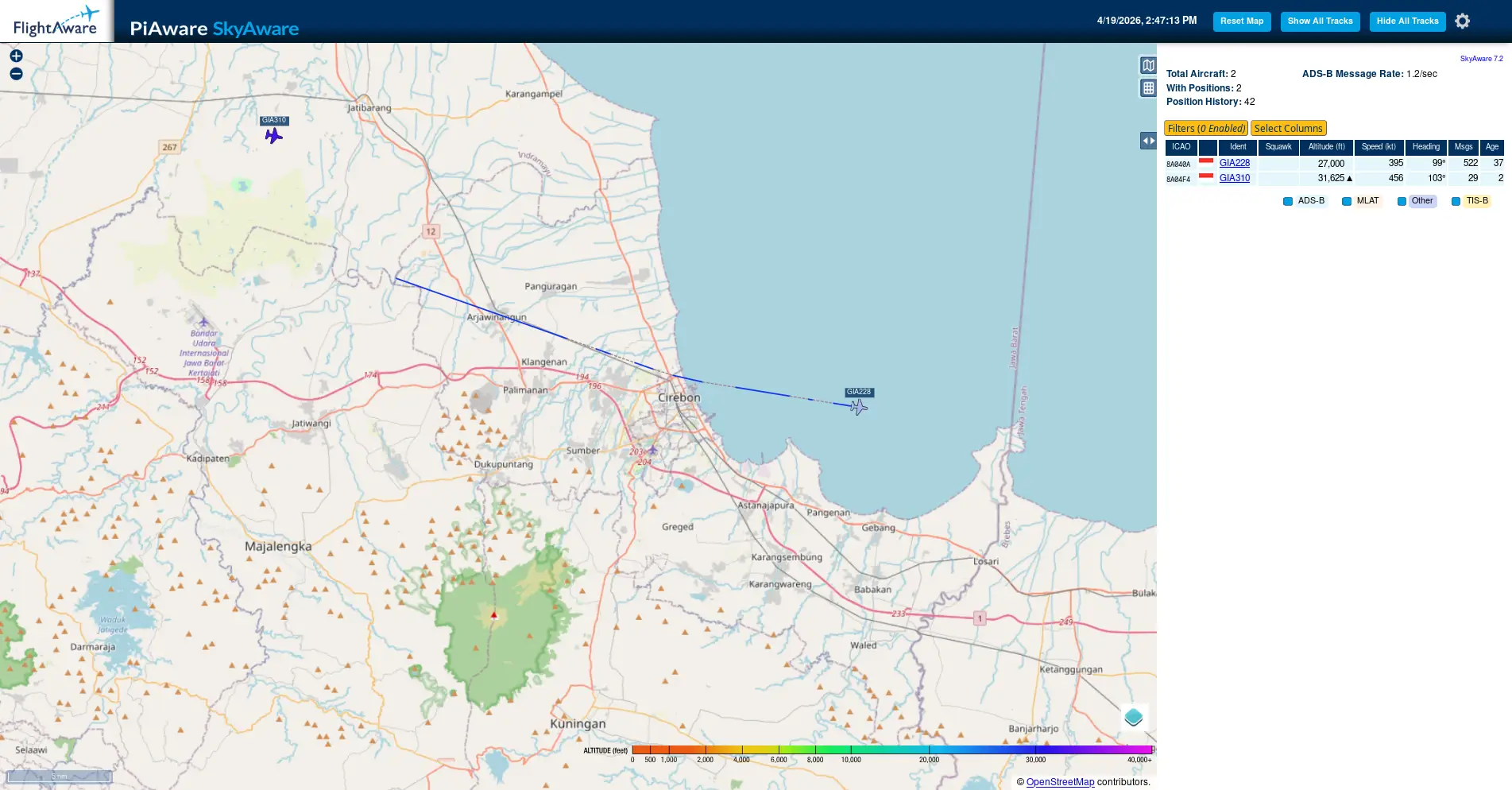
Aircraft Tracking with cheap RTL-SDR
DzEN/DzEN @ 6 March 2026Do you want to tracking about airplane? but hard to claim a free ADS-B Pi-like device? may you want to build your tracking device self! just for chap RTL-SDR Device!
You just buy a RTL-SDR based device like this (this is the cheapest once and works well with ADSB Frequency for tracking Airplane):
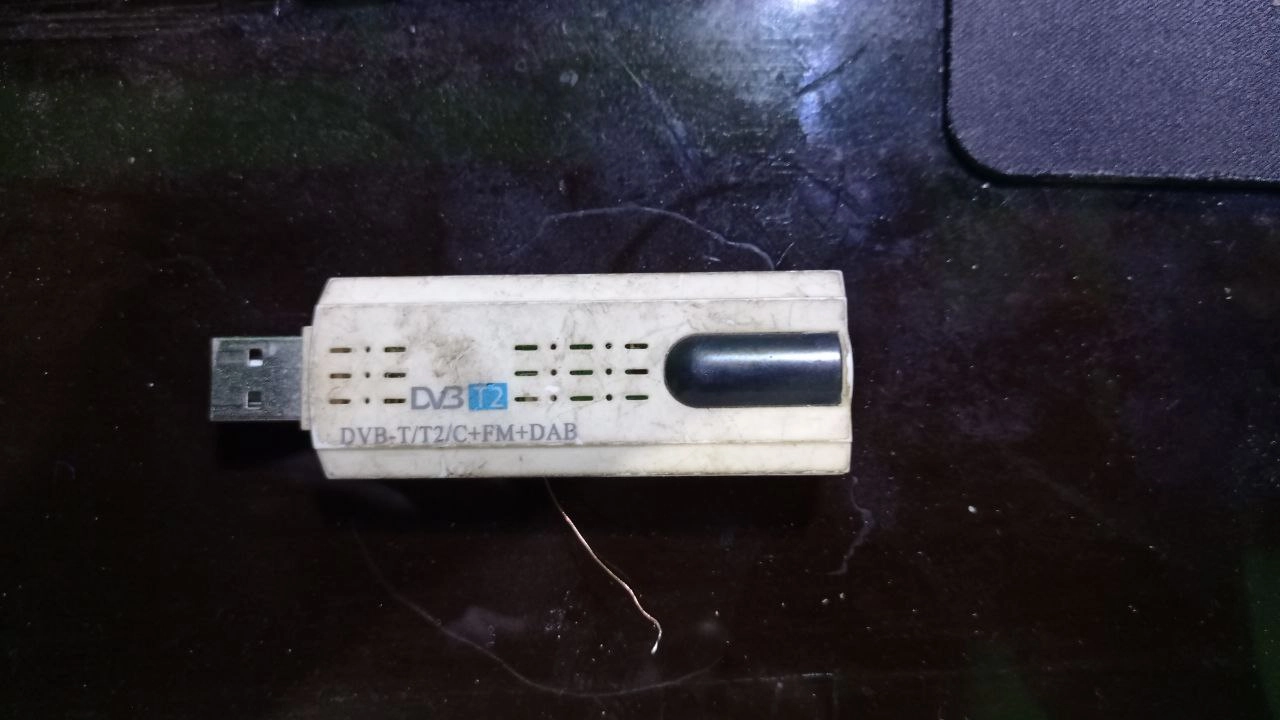 I not recomended RTL-SDR device with chip base on series “Realtek Semiconductor Corp. RTL2838 DVB-T” like device from “EzCap DVB T Stick”. okay what pro with that device? the RTL2838 DVB-T base chip/IC is have high sensitivy/gain receiver from HF 17MHz up to about VHF 180MHz, but the cons of that if you want to for long usage isnt reliable (Frequency dont tune correctly) and for UHF Frequency 400 or up that have bad receiving, that can cause on reciving a ADSB 1090MHz cant easy to listen that, whatever antenna or equipment you have(i had tested on it, and i just use monitor for Radio SW Boardcast, Radio FM Boardcast, Ametur Radio VHF and VHF-Air traffic/ACARS).
And for the antenna sector, if you lazy like me.. :D you can use UHF TV antenna or you just buy an Wifi/Mobile Cellular antena for better receive (Cellular antena is about 900/800-1700/1800MHz, that frequency Cellular is near from ADSB Tracker Frequency).
for installation i used docker-compose, here is configuration i was use: this setup might will you create at first directory “/docker/dump1090/” and “/docker/flightradar/” for core only you can just build service dump1090, if you copy all this compose you can send report to all service tracking sites avaiable below(require account for stats/logging)
Docker Compose
#there is if you want for core service only
services:
  dump1090:
    build: ./dump1090
    devices:
      - /dev/bus/usb
    expose:
      - 80
      - 30001
      - 30002
      - 30003
      - 30004
      - 30005
      - 30104
    image: egortensin/dump1090
    ports:
      - 8080:8080
      - 30005:30005
      - 30003:30003
      - 30002:30002
    restart: unless-stopped
    volumes:
      - '/docker/dump1090/config.js:/usr/share/dump1090-fa/html/config.js:ro'
      - '/docker/dump1090/supervisord.conf:/etc/supervisor/conf.d/supervisord.conf:ro'
    #environment:
    #  RTL_SERIAL: 00000001
##this end of core service

  #Feeder Service
  fr24feed:
    build: ./fr24feed
    depends_on:
      - dump1090
    #expose:
    #  - 8754
    image: egortensin/fr24feed
    ports:
      - 8092:8754
    restart: unless-stopped
    volumes:
      - '/docker/flightradar/fr24feed.ini:/etc/fr24feed.ini:ro'

  piaware:
    image: ghcr.io/sdr-enthusiasts/docker-piaware:latest
    container_name: piaware
    restart: always
    environment:
     - BEASTHOST=dump1090
     - BEASTPORT=30005
     - TZ="Asia/Jakarta"
     - RECEIVER_LATITUDE=**
     - RECEIVER_LONGITUDE=**
     - FEEDER_ID=***  # Get this after first run
    ports:
     - "8090:8080" # PiAware status page
    tmpfs:
     - /run:exec,size=64M
     - /var/log

  adsbexchange:
    image: ghcr.io/sdr-enthusiasts/docker-adsbexchange:latest
    container_name: adsbexchange
    restart: always
    environment:
     - BEASTHOST=dump1090
     - BEASTPORT=30005
     - TZ="Asia/Jakarta"
     - "LAT=**"
     - "LONG=**"
     - "ALT=22m"
     - SITENAME=***
     - "UUID=***"
    tmpfs:
     - /run:rw,nosuid,nodev,exec,relatime,size=64M,uid=1000,gid=1000

  opensky:
    image: ghcr.io/sdr-enthusiasts/docker-opensky-network:latest
    container_name: opensky
    restart: always
    environment:
     - BEASTHOST=dump1090
     - BEASTPORT=30005
     - TZ="Asia/Jakarta"
     - LAT=**
     - LONG=**
     - ALT=22m
     - OPENSKY_USERNAME=***
     - OPENSKY_SERIAL=***
    #networks:
    #  - adsbnet

  airnavradar:
    image: ghcr.io/sdr-enthusiasts/docker-airnavradar:latest
    container_name: airnavradar
    restart: always
    environment:
      - BEASTHOST=dump1090
      - BEASTPORT=30005
      - TZ=Asia/Jakarta
      - MLAT_RESULTS_BEASTHOST=dump1090
      - MLAT_RESULTS_BEASTPORT=30104
      - LAT=**
      - LONG=**
      - ALT=22
      - SHARING_KEY=***
    volumes:
      - '/docker/flightradar/rbfeeder.ini:/etc/rbfeeder.ini'


  pfclient:
    image: ghcr.io/sdr-enthusiasts/docker-planefinder:latest
    container_name: pfclient
    restart: always
    ports:
      - 8091:30053
      - 30054:30054
    environment:
      - BEASTHOST=dump1090
      - BEASTPORT=30005
      - TZ=Asia/Jakarta
      - LAT=**
      - LONG=**
      - SHARECODE=***
Other settings (Config monitor sites):
/docker/dump1090/config.js
// --------------------------------------------------------
//
// This file is to configure the configurable settings.
// Load this file before script.js file at gmap.html.
//
// --------------------------------------------------------

// -- Title Settings --------------------------------------
// Show number of aircraft and/or messages per second in the page title
PlaneCountInTitle = true;
MessageRateInTitle = false;

// -- Output Settings -------------------------------------
// The DisplayUnits setting controls whether nautical (ft, NM, knots),
// metric (m, km, km/h) or imperial (ft, mi, mph) units are used in the
// plane table and in the detailed plane info. Valid values are
// "nautical", "metric", or "imperial".
DisplayUnits = "metric";

// -- Map settings ----------------------------------------
// These settings are overridden by any position information
// provided by dump1090 itself. All positions are in decimal
// degrees.

// Default center of the map.
DefaultCenterLat = **;
DefaultCenterLon = **;
// The google maps zoom level, 0 - 16, lower is further out
DefaultZoomLvl   = 7;

// Center marker. If dump1090 provides a receiver location,
// that location is used and these settings are ignored.

SiteShow    = true;           // true to show a center marker
SiteLat     = **;            // position of the marker
SiteLon     = **;
SiteName    = "mYRadar"; // tooltip of the marker

// -- Marker settings -------------------------------------

// These settings control the coloring of aircraft by altitude.
// All color values are given as Hue (0-359) / Saturation (0-100) / Lightness (0-100)
ColorByAlt = {
        // HSL for planes with unknown altitude:
        unknown : { h: 0,   s: 0,   l: 40 },

        // HSL for planes that are on the ground:
        ground  : { h: 15, s: 80, l: 20 },

        air : {
                // These define altitude-to-hue mappings
                // at particular altitudes; the hue
                // for intermediate altitudes that lie
                // between the provided altitudes is linearly
                // interpolated.
                //
                // Mappings must be provided in increasing
                // order of altitude.
                //
                // Altitudes below the first entry use the
                // hue of the first entry; altitudes above
                // the last entry use the hue of the last
                // entry.
                h: [ { alt: 2000,  val: 20 },    // orange
                     { alt: 10000, val: 140 },   // light green
                     { alt: 40000, val: 300 } ], // magenta
                s: 85,
                l: 50,
        },

        // Changes added to the color of the currently selected plane
        selected : { h: 0, s: -10, l: +20 },

        // Changes added to the color of planes that have stale position info
        stale :    { h: 0, s: -10, l: +30 },

        // Changes added to the color of planes that have positions from mlat
        mlat :     { h: 0, s: -10, l: -10 }
};

// For a monochrome display try this:
// ColorByAlt = {
//         unknown :  { h: 0, s: 0, l: 40 },
//         ground  :  { h: 0, s: 0, l: 30 },
//         air :      { h: [ { alt: 0, val: 0 } ], s: 0, l: 50 },
//         selected : { h: 0, s: 0, l: +30 },
//         stale :    { h: 0, s: 0, l: +30 },
//         mlat :     { h: 0, s: 0, l: -10 }
// };

// Outline color for aircraft icons with an ADS-B position
OutlineADSBColor = '#000000';

// Outline color for aircraft icons with a mlat position
OutlineMlatColor = '#4040FF';

SiteCircles = true; // true to show circles (only shown if the center marker is shown)
// In miles, nautical miles, or km (depending settings value 'DisplayUnits')
DefaultSiteCirclesCount = 5;
DefaultSiteCirclesBaseDistance = 20;
DefaultSiteCirclesInterval = 50;

// Controls page title, righthand pane when nothing is selected
PageName = "PiAware SkyAware";

// Show country flags by ICAO addresses?
ShowFlags = true;

// Path to country flags (can be a relative or absolute URL; include a trailing /)
FlagPath = "flags-tiny/";

// Set to true to enable the ChartBundle base layers (US coverage only)
ChartBundleLayers = false;

// Provide a Bing Maps API key here to enable the Bing imagery layer.
// You can obtain a free key (with usage limits) at
// https://www.bingmapsportal.com/ (you need a "basic key")
//
// Be sure to quote your key:
//   BingMapsAPIKey = "your key here";
//
BingMapsAPIKey = null;

// Turn on display of extra Mode S EHS / ADS-B v1/v2 data
// This is not polished yet (and so is disabled by default),
// currently it's just a data dump of the new fields with no UX work.
ExtendedData = true;


DefaultMaxAltitudeFilter = 65000
DefaultMinAltitudeFilter = 0
DefaultMaxSpeedFilter = 1000
DefaultMinSpeedFilter = 0
/docker/dump1090/supervisord.conf
[supervisord]
nodaemon=true

[program:lighttpd]
command=/usr/sbin/lighttpd -D -f /etc/lighttpd/lighttpd.conf
stdout_logfile=/dev/stdout
stdout_logfile_maxbytes=0
stderr_logfile=/dev/stderr
stderr_logfile_maxbytes=0

[program:dump1090]
command=/usr/bin/dump1090-fa --gain -10 --net --lat ** --lon ** --fix --write-json /run/dump1090-fa --json-location-accuracy 1
stdout_logfile=/dev/stdout
stdout_logfile_maxbytes=0
stderr_logfile=/dev/stderr
stderr_logfile_maxbytes=0
/docker/flightradar/fr24feed.ini
receiver="avr-tcp"
fr24key=**
host="dump1090:30002"
bs="yes"
raw="yes"
mpx="no"
mlat="yes"
mlat-without-gps="yes"
/docker/flightradar/rbfeeder.ini
[client]
network_mode=true
log_file=/var/log/rbfeeder.log
debug_level=0

key=***
lat=**
lon=**
alt=22
sn=**

[network]
mode=beast

external_port=30005
external_host=172.30.0.8
[mlat]
mlat_cmd=/usr/bin/python3 /usr/local/bin/mlat-client --results beast,connect,dump1090:30104
autostart_mlat=true
That’s All! Happy Experiment!!